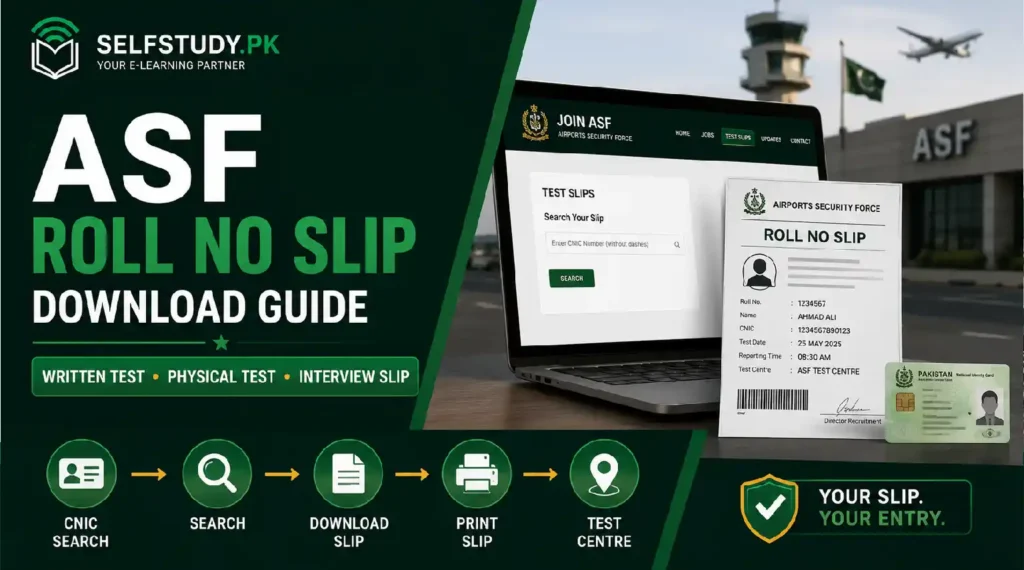
If you have applied for an ASF job, the roll number slip is the one document you cannot walk into your test without. It carries your test date, reporting time, and center address, and ASF will not let you sit the paper without it. At SelfStudy PK, we track every ASF recruitment cycle, and this guide walks you through downloading your slip the exact way joinasf.gov.pk expects, plus what to do when the download does not work on the first try.
Quick answer: Download your ASF roll number slip at joinasf.gov.pk, under the “Test Slips” section of the site. Enter your CNIC number without dashes, then search. The same section also lets you pull your interview slip and check your rejection reason if you were not shortlisted. There is no separate “roll no slip” website. If your CNIC search returns nothing, your application has not yet been processed for the current batch, or you registered under a different CNIC than the one you are searching with.
Where to Download Your ASF Roll Number Slip
Every slip ASF issues, whether it is for the written test, the physical test, or the interview, comes from the same portal you used to apply. There is no separate download page and no app.
On joinasf.gov.pk, look for the Test Slips menu item on the main navigation. From there you can pull:
- Written test / roll number slip — search by CNIC (without dashes) or by the roll number you were issued at registration.
- Physical test slip — issued once you clear the written stage, using the same CNIC-based search.
- Interview slip — issued to shortlisted candidates, searchable by CNIC or roll number.
- Rejection reason lookup — if your CNIC does not return a slip, this same section tells you whether your application was rejected and, in most cases, why.
None of these require a login in the traditional sense. You search directly by CNIC, which is also why keeping your CNIC number accurate on your original application matters so much.
Step-by-Step: Downloading Your Roll No / Written Test Slip
1. Go to joinasf.gov.pk: Do not search “asf roll no slip” and click the first result. A large number of the pages ranking for that phrase are outdated job-board copies, not the live portal.
2. Open the Test Slips section: This sits in the main menu alongside Home, Jobs, Updates, and Contact.
3. Enter your CNIC number, without dashes: For example, enter it as 13 continuous digits (like 1310112345671) rather than in the dashed format printed on your card.
4. Search, then download and print: Once your slip appears, download it as a PDF and print a clear copy. Bring the printed slip plus your original CNIC to your test center — most centers will not admit a candidate on a phone screenshot alone.
If Your CNIC Search Returns Nothing
This is the single most common problem candidates report, and it usually comes down to one of these:
- Your application has not been processed yet. Slips are typically issued in the weeks after the job apply last date closes, not immediately. If the current advertisement’s deadline has only just passed, wait and check again rather than assuming an error.
- A CNIC mismatch. If you entered your CNIC with a typo at registration, or you are searching with dashes when the field expects none, the search will return nothing even though your application exists.
- The batch has closed and slips for that cycle are no longer live. Slips are generally tied to the specific advertisement you applied against.
If none of these explain it after a few days, that is a case for ASF’s own helpline rather than guesswork
see our ASF Offices & Contact Numbers page for the numbers to call.
ASF Physical Test Slip Download
The physical test slip works exactly like the written test slip: same portal, same CNIC-based search under Test Slips, issued once ASF has cleared you from the written stage for uniformed jobs (like Corporal or ASI). If you searched before your written result was finalized, that is why nothing appeared. We cover what physical standards ASF checks for at that stage on our ASF Physical & Medical Test page.
ASF Interview Slip Download
Same portal, same section, different stage. Your interview slip becomes available only after you have been shortlisted past the written and (for uniformed jobs) physical stages. If you are searching for your interview slip and getting no result, it typically means the shortlisting for your batch has not been finalized yet, not that something has gone wrong with your account.
See our ASF Interview Questions & Preparation Blog once your slip is in hand.
What About the ASF Challan Form or Appointment Letter?
A smaller number of candidates search for an “ASF challan form” or “ASF appointment letter.” To be precise about both, since misinformation spreads fast around recruitment portals:
- Challan form: ASF’s recent recruitment drives have not required candidates to deposit a test fee through a bank challan. If a specific batch does introduce one, it will appear as a downloadable form inside your joinasf.gov.pk account for that application, not as a separate public download.
- Appointment letter: This is issued only after you clear the full selection process, written test through interview, and appear on the final merit list. It is not something you can search for or download in advance of selection.
Downloading the correct slip at each stage only gets you into the room. Whether you clear the paper once you are sitting it depends on how well you have actually worked through real ASF questions beforehand, not just read about the pattern in general terms. That is the gap most candidates underestimate, and it is exactly why we point serious candidates toward solved past papers rather than a generic syllabus list once their slip is confirmed.
👉 Slip downloaded, test date confirmed? Now make it count — see our ASF Past Papers & Test Preparation Books guide for solved papers matched to your exact post.
FAQs
Where do I download my ASF roll number slip?
At joinasf.gov.pk, under the Test Slips section. Search using your CNIC number without dashes, then download and print the PDF.
Why is my ASF roll no slip not showing up?
Most commonly because your application has not finished processing yet, you have a CNIC mismatch with your registration, or the batch’s slip window has not opened. Wait a few days after the advertisement’s last date before assuming an error.
Can I download my ASF slip using my roll number instead of CNIC?
Yes, for interview and written test slips, joinasf.gov.pk accepts either your CNIC or your assigned roll number as the search field.
Is there a separate website for ASF physical test slips or interview slips?
No. All slips, written test, physical test, and interview, are issued through the same joinasf.gov.pk portal under Test Slips.
Do I need to pay a challan fee to get my ASF slip?
Recent ASF recruitment drives have not required a bank challan or test fee. Always check your own application dashboard for the current batch rather than assuming, since requirements can change advertisement to advertisement.
When is the ASF appointment letter issued?
Only after you clear the written test, physical/medical test (for uniformed jobs), and interview, and your name appears on the final merit list. It cannot be downloaded in advance.